

Why This Matters
Most Gong implementations were built during the free era, which means the configuration decisions that seemed reasonable two years ago - scan everything, track everything, leave it running - are no longer your best bet for using credits wisely.
The customers we're seeing on track to use the most credits aren't power users who went wild with AI; they're teams who set things up thoughtfully and never had a reason to revisit.
The credit model doesn't change what Gong can do, but it does change the cost of failing to optimize your configuration.
And because credits stop at zero with no warning bill, the first sign of a problem for a lot of teams will be trackers silently going dark.
By the Numbers
Credits per seat annually: ~2,000
Cost per additional credit: $0.015
Cost per smart tracker scan (call): ~0.5–1 credit
Cost per email scanned: ~0.1 credit (1 per 10 emails)
Cost per web search in a brief: ~5 credits
The 3 Habits Burning the Most Credits
Habit 1: Smart Trackers Scanning Every Email
This is the biggest hidden cost. Email volume is effectively unlimited - you only have so many calls, but a busy team sends and receives thousands of emails a month.
A single company-wide tracker scanning all email can consume a full seat's monthly allotment before it ever even touches a call.
Be deliberate about which trackers get email scanning. It earns the credit when the information actually lives in writing (not on the call), when you need to know what was said (not just whether a topic came up), and when the email is tied to an active deal.
Trackers where email scanning genuinely pays off:
- Pricing & discount requests - budget negotiations happen in writing
- Security, legal & procurement requirements - these arrive as detailed written asks, not verbal flags
- Churn & renewal risk - customers often raise concerns to their CSM in writing between calls
- Stakeholder changes - role changes are communicated in writing and you need to know immediately
Everything else: scope to calls only, or use a keyword tracker (it’s free).
Habit 2: Trackers with No Scope or Filter
A smart tracker scanning every call costs credits proportional to call volume. A high-volume team running 10 unscoped trackers is burning through their allotment fast.
Before adding a filter, ask the question: what decision does this tracker actually drive?
If the answer is "we just want visibility," that's a signal to use a keyword tracker or skip it. Smart trackers are for when the content of the answer changes what you do next.
Once you've confirmed the tracker earns its place, add scope:
- Limit to calls associated with a deal
- Limit to a specific team or role
- Limit to a deal stage where the information actually matters
Just one filter can cut a tracker's credit consumption significantly.
Habit 3: Web Search Baked Into Every Brief
Each web search in an Engage brief costs ~5 credits.
A rep running briefs on 200 calls a month burns ~1,000 credits on web pulls alone (half their monthly allotment) often for data they already have in their CRM or enrichment tool.
If you're using Clay, ZoomInfo, Apollo, or any dedicated enrichment tool, you're paying for that data twice. Mirror the fields you care about onto the Salesforce objects Gong reads from (Contact, Lead, Account, Opportunity) and pull from there instead.
Keep web search in briefs for the cases where outside context would genuinely change how you prep: recent funding, leadership changes, news your CRM won't have. And limit it to your highest-stakes meetings.
FAQ
Does everything in Gong use credits now?
No. The majority of AI actions in the platform don't consume credits. Smart trackers, web search in briefs, and the MCP/briefs API are the main consumption areas. Most standard platform features are unaffected.
What happens when I run out of credits?
Jobs stop running. There are no surprise overage bills, but running out isn't consequence-free; your trackers go dark and your briefs stop pulling web context.
How do I check my current credit usage?
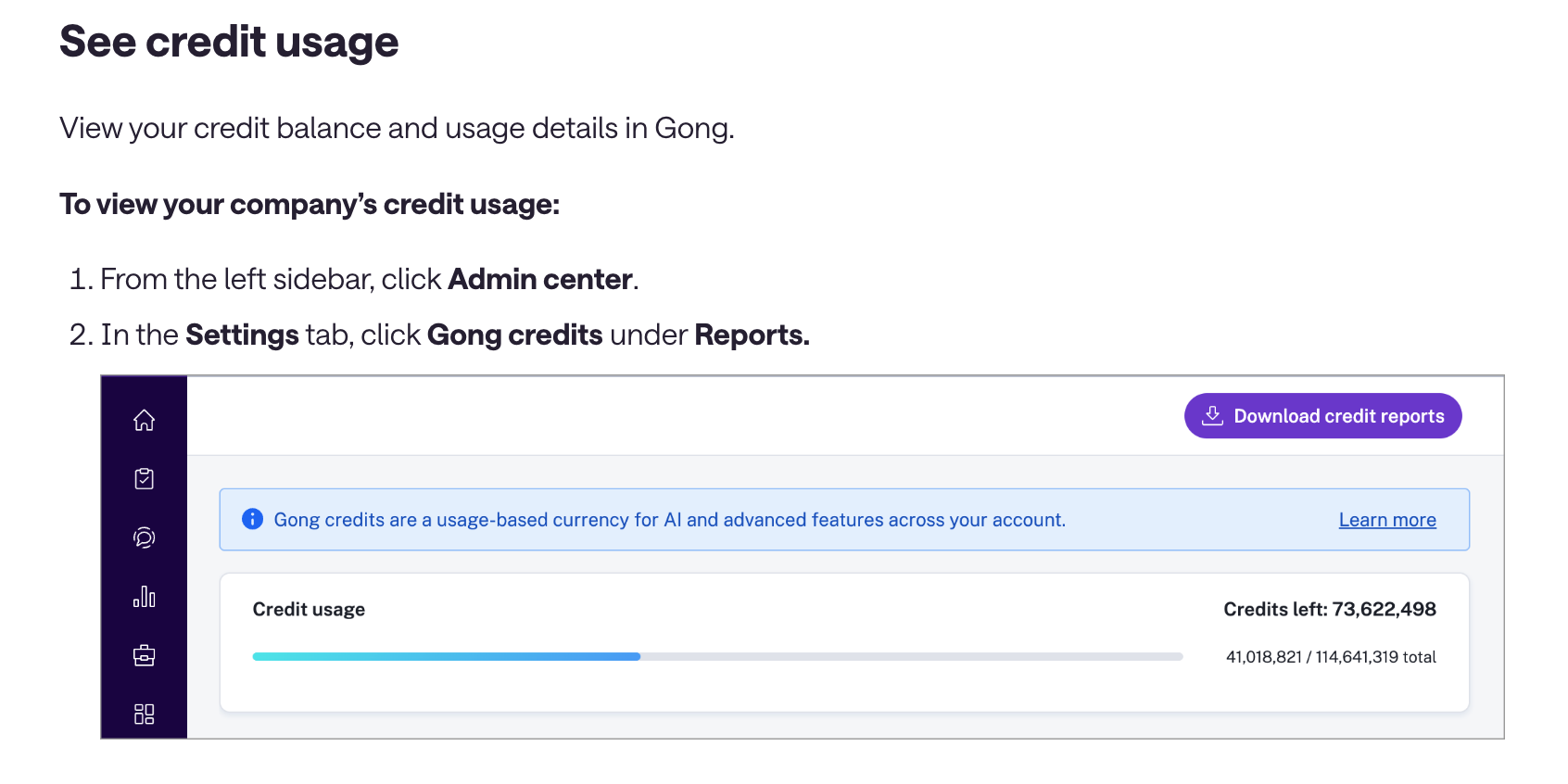
Two ways: (1) In the admin center under credit usage monitoring, and (2) the exportable usage history report. When building or editing a smart tracker, Gong also shows a live usage estimate based on your current filter settings.
What's the difference between a keyword tracker and a smart tracker?
A keyword tracker finds exact words or phrases in transcripts - it’s fast, free, and great for knowing whether something came up. A smart tracker is an AI model that looks for concepts - what was actually said about competition, what the objection was, what the sentiment was. Use keyword trackers for detection and smart trackers for analysis.
Are Gong's prebuilt smart trackers any good?
Yes! Gong has 20+ prebuilt smart trackers trained on a large volume of calls. They consume zero credits. If a prebuilt gets you 80-85% of the way there, that's usually better than building something custom that costs credits every time it runs.
What about the Gong MCP - does that use credits?
Yes. The native Gong MCP and the briefs API consume credits. If your team is actively using these, factor that into your credit budget.
Who do I contact for pricing or contract questions?
Your Gong Revenue Architect(formerly CSM). They have the context on your specific contract and objection-handling support.
Pro Tips
01. Start with the prebuilt library. Before building any smart tracker, check what Gong already offers. They have 20+ trackers that use zero credits.
02. One filter makes a big difference. Adding a single "associated to a deal" filter to a broad tracker can cut its credit consumption by more than half. It also cuts down on noise.
03. Retire trackers on a cadence. Set a recurring review (quarterly works for most teams) to audit what's live, what's driving action, and what got built for a campaign that ended six months ago. Trackers don't expire on their own.
04. If it's a detection question, use a keyword tracker. Reserve smart trackers for when you need to know the substance and context of what was said.
05. Credit usage is a signal, not just a cost. A tracker consuming 10,000 credits/month (~$150) that helps save one deal is a bargain. The same tracker running on calls where it's making no impact is a waste.
06. Don't wait for the notification. Gong is rolling out credit allotment notifications in phases. By the time you get yours, you may already be running over. Check your credit usage now - it's in the admin center.
What to Do This Week
01. Pull your smart tracker list and flag anything with no team or deal filter
02. Check which trackers are scanning email and scope them or swap to keyword trackers where the use case fits
03. Audit your brief templates for web search - redirect to CRM fields where you already have the data
04. Check Gong's prebuilt tracker library before your next build
05. Set a calendar reminder for a tracker review next quarter
Questions about your specific setup? Let us know!
Go Nimbly offers a Gong health audit to assess credit risk and prioritize fixes.